

LifeSize Icon Series


If you want an easy-to-use worry-free video conferencing system, then Lifesize Icon is your best choice.Lifesize Icon takes "simplicity and convenience" as its basic design concept. It only takes a few minutes to complete the setup, and it only takes a few seconds to start a video call. You will soon find that making and receiving video calls is as easy as using a smartphone. We think you might prefer video calls to audio calls. Lifesize Icon provides you with a powerful form of personal communication-face-to-face communication, which can improve efficiency and strengthen interpersonal relationships. Lifesize Icon eliminates the troubles caused by technology and enables your users to concentrate on their business. | 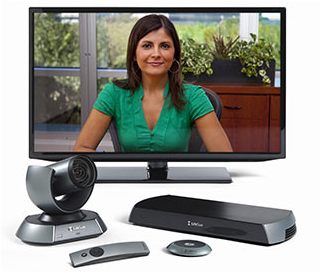 |
Product details:
|
Lifesize Icon is very friendly, simple and intuitive from installation settings to user interface, and will not make people feel any difficulties. Just press the button and you can have face-to-face discussions with your customers, partners, suppliers and colleagues immediately. only Lifesize Icon enables you to quickly browse menus, scroll your address book and make calls without leaving the screen. |
|
with Lifesize UVC core application *, you can click on the name in the address book to expand multi-person calls. This function is very powerful, especially when the conversation involves other people's fields of expertise, and this person often travels around or works in other locations. Now you can add these people to the meeting instantly. Even mobile callers can use Icon, an easy-to-use video conferencing solution, to join the conference instantly and seamlessly. * Lifesize UVC core applications (separate purchase packages) are pre-installed in Lifesize hardware, which is very convenient or can also be used as virtual machine software (VMware®And HyperV®) provided. |
|
you can use the playback and recording application to convey information to employees in real time and record the video for future playback (it can be played on almost any device). It is your private video center, expanding the functions of Lifesize Icon system and greatly increasing the value of your investment. |

| Top-level performance, perfect experience |
participate in unprecedented high-definition video conference and enjoy the perfect experience brought by high-tech. The 1080p60 HD video support function enables clarity and smoothness to reach the extreme, and the 1080p demonstration function can fully display every detail and promote barrier-free communication among all parties in the meeting. |
The extremely simple video conferencing experience |
LifeSize Icon system adheres to the principle of "simplicity first. With the help of this product, you can easily manage the video conference schedule. If a meeting is delayed due to something, the system will send out a timely reminder. The operation of finding and participating in multi-person meetings is very simple. When video communication is needed, it is also convenient to search for business contacts. You can also record and stream important meetings. With this new video communication system, you can immediately experience all the above conveniences, and of course there are other functions to tap. If you need more features in the future, you can contact your IT support department to enable the appropriate features and applications. The advantage of LifeSizeIcon series lies in its unparalleled flexibility and simplicity. Our design aims to maximize customer value.
|
Seeing is believing |
|
|
|
|
|
|
|