

Lifesize UVC platform


Perfect Experience of Intelligent Video Conferencing Lifesize®UVC Platform™ |  |
| |

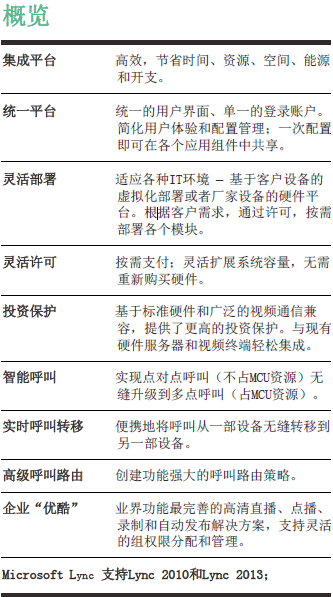
Lifesize UVC Plaform the industry's first real adoption a unified video infrastructure to achieve perfect control and flexibility active intelligent video communication solution platform. is people-oriented, intuitive and easy to use. •is user-centered and calls by user list are realized to eliminate the confusion of using long number calls. •User-centered, seamless call switching between multiple devices of one account •User-centered and intelligent convergence of multiple groups of conferences •User-centered, intuitive invitation to non-registered customers and one-click membership of customers •takes Internet thinking as the concept and pursues the ultimate user experience. •Rich user permissions: Multi-user hierarchical and decentralized permissions by video group and user group. rich functions, which are ready to go. •You can hold a meeting with one click. •You can call "Upgrade" with one click" •Supports one-click recording •Booking and automatic distribution of recorded content •Automatic device management and configuration push •Flexible automatic device upgrade policies •Supports powerful conference control functions: terminal split screen, snapshot, cloud control, etc. Easy deployment and easy management •Supports "first-line" deployment based on manufacturer hardware •Supports virtualization deployment based on customer hardware •Supports deployment of components by license •Supports complete system backup and recovery mechanisms •No Professional Management Required |
|
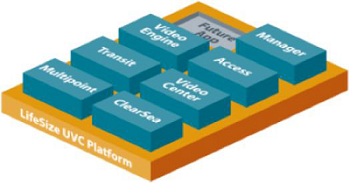
| Lifesize®UVC Platform™ | Specifications |

Device Deployment Selection Lifesize UVC 1150 hardware Lifesize UVC 3350 hardware Lifesize UVC 3380 hardware Lifesize UVC Platform Virtual Machine Software Deployment LIFESIZE UVC virtual machine software supports VMware vSphere Hypervisor (ESXi) version 5.1 and later supports Microsoft Hyper-V 2.0 and 3.0 versions Network Interface: 10/100/1000 Ethernet Adapter Linux system with enhanced security can be configured by the administrator. VM configuration processor: 2x Intel Xeon E5-2650, 2.0 GHz Memory: 32GB DDR3 1600 Disk space: minimum 100GB ENI: Minimum 1 Gbps LIFESIZE UVC hardware configuration (1150/3350/3380) size: 17.2 inches wide x 1.7 inches high x 25.6 inches thick Dual Gig E network adapter: 2 x RJ45 Redundant Hard Disk: MD Raid 10 stores up to 2,600 hours of 768 kbps HD video (Lifesize UVC VideoCenter) power type: AC voltage: 100V-240V 50/60Hz, maximum 7.5 A (power = 600 watts) (UVC 1150) redundant power supply (hot plug): AC voltage: 100V-240V 50/60Hz, (power = 700 watts) (UVC 3350 and UVC 3380) | Work environment data (UVC 1150/3350/3380) operating temperature: 5°C (41 °F) to 35°C (95 °F) working humidity: 8% to 90%, non-condensing storage temperature: -40 c (-40 f) to 60 c (140 f) Storage humidity: 5% to 95%, non-condensing weight: UVC 1150 HW: 11.97kg (26.4 l lb), UVC 3350 and UVC 3380 HW: 13.34kg (29.4 l lbs) continuous compliance = UVC 1150 HW: 85.2 watts (290.70 Btu/hour), UVC 3350 HW: 250 watts (853 Btu/hour), UVC 3380 HW:397W (1354.56 Btu/h) idle = UVC 1150 HW: 66.2 watts (225.87 Btu/hour), UVC 3350 HW: 124.7W (425.48 Btu/h), UVC 3380 HW:133.5W (455.50 Btu/h) Unified WEB interface management WEB interface to manage all Lifesize UVC applications Configure multiple applications on a single platform Multi-language WEB user interface, supports 10 languages Mainstream web browsers are supported. For more information, see the release notes. System management Firmware Version Update Tool supports REST API third-party integration (Lifesize UVC VideoCenter) enable or disable UVC applications from the WEB interface Manage network configurations for all applications The Web interface can monitor key system parameters, such as CPU, local disk, and NAS availability and usage supports IPv6 Support Management-Lifesize UVC Manager SNMP | Verification and authorization supports enterprise Active Directory/LDAP Integrated local user management capacity For more information, see Application Capacity independent capability is limited to each application running on hardware/device Built-in capacity planning tools help administrators plan and manage hardware resources Integration license Web-based license management is adopted for product activation. Activation of online and offline licenses Add More Capacity to Existing Products Flexible license expansion Increase capacity Free trial: For more information, see the capacity application table. security HTTPS-based network Access SSH is used for diagnosis. Supports static NAT deployment capabilities. is the maintenance activity locking service. Supports deployment in DMZ or private LAN |
| Lifesize®UVC ClearSea™ |
communication protocol H.323,SIP H.264, H.263, H.263 and other video protocols Supports H.323 and SIP device registration Video performance Up to 1080p30fps The maximum number of desktop calls is 2 Mbps. demonstrationstandards and agreements H.239 and other agreements demo protocol demo of H.239 security H.323/SIP encryption through AES HTTPS security management System management Web configuration is supported. Supports REST APIs Other Features The guest invitation function is supported. There is no limit to the number of invitations. unified ringing function, each account can use up to 5 devices to register unified directory of mobile devices, desktop devices and conference room terminals advanced call routing Supports dual-network LAN and WAN Supports recording and streaming media on demand | Lifesize UVC ClearSea Client: Windows and Mac operating systems Video Standard video standards such as H.263, H.263, and H.264 Video specifications/video resolution Supports up to 1080p30 and 720p60 resolutions can be adjusted adaptively based on the number of available CPU cores audio standards and functions G.722.1 Annex-C, G.722.1, G.711 μ code, G.711 A code full-duplex acoustic echo canceller with audio noise reduction filter Other Features H.239 demonstration (up to 1280 x768) Video sharing remote camera control (H.224, H.281) Real-time call forwarding: transfer calls from one device to another without interrupting the meeting. H.323/SIP encryption through AES in Windows Media Video (WMV) or Quicktime (MOV) instant messaging Online status bandwidth adaptation Adaptive packet loss and delay compensation Asymmetric uplink/downlink bandwidth (for example, ADSL) Minimum System Requirements Windows XP/2003/Vista/7/8 (including 64-bit version), DirectX 9.0c or later Mac OS 10.6 Snow Leopard or later any x86 CPU with SSE2 command (audio/high resolution video call) kurui 2 dual-core class, 2.33 GHz(H.264,720p video call) kurui 2 quad-core class, 2.66 GHz (h 264,1080p video call) 1GB of memory and 30MB of hard disk space | Lifesize UVC ClearSea Client: mobile device characteristics address book, call history, and static drawing functions instant messaging Online status Real-time call forwarding: transfer calls from one device to another without interrupting the meeting. demo of H.239 remote camera control (H.224, H.281) H.323/SIP encryption through AES Video H.264 decodes HD 720p 30fps on the following devices: iPhone 5, iPhone 5S, iPhone 5c, iPad, iPadAir, HTC One S, HTC One X, SamsungGalaxy Tab10.1, Google Nexus 10, Motorola Xoom and Acer Iconia H.264 decodes HD 720p 15 fps on the following devices: iPhone 4S, iPod Touch 5th generation, iPa 2, iPad 3rd generation, iPad Mini H.264 decoding qHD on some Android devices H.264 encoding/decoding on some Android devices with the highest CIF resolution (352 x288)30fps audio G.711 μ-law encoding, A- law encoding and other audio standards Recommended Equipment Android: HTC EVO, Desire HD, Incredible, Sensation, myTouch 4G, Droid Incredible II, ThunderBolt, Flyer P512, Evo 3D, One X, One S/Samsung Epic, Galaxy S, Galaxy S II, Galaxy S III, Galaxy S4, Galaxy Tab, Galaxy Tab 2, Galaxy Tab 10.1, Captivate, Fascinate, Vibrant, Mesmerize, Galaxy Note, Galaxy Note 2, Sidekick 4G, Infuse 4G, Droid Charge, Conquer/Google NexusOne, Nexus S, Galaxy Nexus, Nexus 7, Nexus 10, Dell Streak 5, Streak 7/Motorola Atrix 4G, Xoom, Droid Bionic/Acer Iconia Tab A500/Amazon Kindle Fire HD 7, Kindle Fire HD 8.9. This list only includes certified equipment; Other Android equipment can also be can be applied to Lifesize UVC ClearSea. iOS: iPhone 5S, iPhone 5c, iPhone 5, iPhone4S, iPhone 4, iPod touch 4th and 5th generation, iPad Air, iPad with Retina display, iPad Mini, iPad 3rd Generation, iPad2, iPad, and iPhone 3GS (iPad does not have a video camera, so only remote video is displayed) (if available); iPhon 3GS uses a back camera. Windows: Microsoft Surface Pro |
| Lifesize®UVC Multipoint™ |
communication protocols and video standards H.323, SIP, H.320 (ISDN), through the gate, through the Lifesize Networker to connect H.263 H.264, H.264 SVC RTVideo can increase capacity and additional audio ports For more information, see the "Permission" table below. Video performance supports up to 200 resolution processing Supports multi-device cascade and cluster hot standby The on-demand rotation function is supported. supports centralized control of conference room cameras Preview of conference room images supports address book and conference push audio standards and performance AAC-LC, G.722.1c 48 Kbps, 32 Kbps, 24 Kbps (Siren 14), G.722.1 32 Kbps, 24 Kbps (Siren 7), G.722, Standard audio protocols such as G.711(μ-law encoding) and G.711(A-law encoding) DTMF tone detection broadband audio mixing demonstration standards and protocols H.264, H.263, H.263, H.261 and other video protocols H.239,BFCP (binary voice control protocol) Data sharing does not affect port capacity. Supports mobile and Lync users to receive and send demo content IVR function instructs participants in meeting selection The audio and video participants are prompted to enter the conference ID and PIN. provides localized voice prompts in 15 user-selectable languages | layout the unique layout of each participant, with the help of the video system, selects through the Web user interface and DTMF tones rich split screen layout, up to 49 split screens supports voice incentive switching and automatically places the speaker in the main window. screen prompt text and icon prompts to display the participant's name, audio mute, and image. mute and the encryption status User and administrator settings to display the venue name during the meeting. meeting support Direct call via H.323 or SIP Supports automatic call expansion supports registration with the gateway and SIP server conference One-click multi-party meeting supports instant meetings and scheduled meetings. System management Supports Web Supports APIs Supports system configuration and conference management Multilingual Web User Interface Supports real-time meeting management: • Audio mute/unmute (entire meeting or a participant) Select a layout for the entire meeting or participants • Add participants by external dialing Termination (entire meeting or individual participant) Personal Statistics Report Drag and drop participants between meetings Enable/Disable Conferencing Persistent Terminal Name Video Participant Screenshot and Camera Control | security PIN to protect meetings H.235 AES and SRTP/TLS encryption HTTPS security management Secure API access Service Quality QoS support through Diffserve and TOS/IP priority Forward Error Correction (FEC) function to restore video in packet loss environment logging audio, communication, database, license manager, system management, system information, system status, timer, user interface, and video redundancy control Call Details Record (CDR) Microsoft Lync support to register the meeting with Lync 2010 and Lync 2013 through SIP, H.323, Microsoft RTVideo and Microsoft H.264 SVC for split-screen bridging Microsoft AVMCU cascading support Infrastructure support external gateway and SIP PBX conference registration is implemented by Lifesize UVC Transit client/server NAT/Firewall Crossing is simple to implement using static 1:1 NAT or dual network IP address (LAN/WAN) NAT/Firewall Crossing NTP (network time protocol) supports Lifesize Networker Support Through Gategate |
| Lifesize®UVC VideoCenter™ |
compatibility Record video and record data: from Lifesize Icon series, Lifesize 220 series, Lifesize Unity 50 and Non-Lifesize Using SIP on the video system playback on Windows, Linux and Mac computers and iOS devices Supports mainstream web browsers Supported use Recording/Live when no call is made Point-to-point or multi-point call recording/live broadcast allows you to watch live or on-demand on mobile devices. One-click recording Select the bandwidth to view different resolution videos. Archive and import high-definition videos with a resolution of up to 1080p30 Upload and publish videos to UVC VideoCenter The recording function Record audio, video, and shared data Dynamic video capture and data without preconfiguration. The recording resolution is dynamically adjusted according to the network conditions. Selectively record near-end video, remote video, or all video You can use the recording key to automatically store a specified channel. The recording icon prompts the authorization of the recording key. Use IVR to enter PIN during SIP-based recording Supports audio-only and data-only streaming. BFCP protocol is supported for demonstration streaming in SIP-based recording. Supports packet loss recovery for video streaming. Video and audio formats 1080P HD, 16:9 aspect ratio H.264 AAC-LC and G.711 API (Application Programming Interface) Use REST API and Lifesize UVC Video Center Seamless integration with external systems verification support and highly scalable | report access reports to track viewing methods Download the original CSV data of each video to create a custom report. plan report storage Large internal storage space for high-definition video storage. Supports RAID10. You can use networked storage (NAS, etc.) to further expand the video storage space. Automatic publishing automatically add title and tag records and archive them to the correct channel, Automatically assign access rights and publish videos to the network Live streaming and ApsaraVideo for VOD No plug-in is required A single group supports up to 1,000 live live streaming. A single group can support up to 350 on-demand HD VOD Supports live streaming and on-demand streaming on iPad, iPhone, and iPod You can manually adjust the layout of video and data images during live streaming or ApsaraVideo VOD. You can dynamically control the playback layout on your PC and Mac: side by side, picture-in-picture, Individual videos and individual data automatically adjusts the live broadcast rate to provide the best user experience chat live text chat, which can be expanded to 1,000 participants closed captions Supports PC, Mac, and iOS devices to create, add or upload subtitle text in multiple languages Search by Subtitle Interconnection (ENT) minimizes bandwidth usage between sites for real-time video across multiple distributions Easily Share Content in UVC Video Center Lifesize Bandwidth Planning and Scalable WAN Streaming Seamless Connection with Remote Viewers | Content management Multilingual Web User Interface (10 Languages) Supports video metadata, comments, and downloads Edit thumbnails Upload thumbnails to the video page Advanced Search Add chapters to videos Fixed URLs are supported. multicast Supports large-scale real-time streaming and one-time configuration. Multicast layout options selected by the administrator User access control Security-based configuration files and permissions Users can only watch videos for which they have access. The recording key prevents unauthorized recording. System management Incremental FTP/NAS backup Supports static NAT deployment in the System Management section. Register with SIP registrar to enable recording Allows administrators to monitor or terminate running recordings and streaming supports users/groups in local and enterprise LDAP directories Offline transcoding is supported. Restore factory settings All and Some Restore Functions Integration with Blackboard Learn integration with Blackboard Learn 9.1 or later allows you to view from the Blackboard Learn Web user interface. Watch real-time or on-demand videos comply with the permissions defined on the Blackboard Learn Integration with VBrick and VBrick Enterprise Media System (VEMS) 5.4 or later integration |
| Lifesize®UVC Manager™ |
compatibility is compatible with most Lifesize infrastructure products and supports Lifesize video systems are tightly integrated (see release instructions for details) Web-based interface an integrated and easy-to-use Web interface is used to monitor your video network. panel home screen provides information about the entire video infrastructure Video Management Suite discover, manage and monitor video systems and bases from Lifesize basic equipment management Lifesize system based on H.323, H.320 and SIP Supports large-scale planning and temporary video terminal upgrades SNMP trap management add non-Lifesize external devices for reservation calls Supports HTTPS-based APIs Real-time alerts, filters, and workflows Use SNMP traps to monitor critical events (verification failures and software upgrades). level, temporary calls and various other network activities of the video system) automatically notify technicians via email allows you to create multiple logical networks. Assign administrators based on network locations System group and directory service assign video systems and infrastructure to logical groups for group-based management Address Book Management standard-based H.350 user directory supports LDAP and Active Directory environments | Intelligent scheduling supports plug-in-free and Microsoft Exchange Server 2010 SP1 and Microsoft Exchange Server 2007 SP3 Integration rich calendar interface for video calls and upgrade plans Visual management embed the calendar Lifesize UVC Manager in any web page use any calendar application to schedule video calls on any device a simple web scheduler to easily set up video calls Resolve capacity conflicts Optimize bandwidth and quality through intelligent resource scheduling managed network video recorders can be automatically selected based on video equipment network to provide easy-to-set recording/streaming sessions. Video systems in other networks can be added through external devices Send the invitation MCU prefix by using the IP address, ISDN, e.164, or SIP address. MCU can be automatically selected for video calls as needed view idle and busy schedules for all devices when planning calls or upgrades can change conference hosts when planning video calls Real-time Event Manager Add Participants, Disconnect Participants, and Stop Calls displays call statistics for each system View a real-time snapshot of the current meeting. On or off the mute function Enable or disable Do Not Disturb" Real-time packet loss and jitter monitoring Monitor ongoing video calls and upgrades on specific networks View the details of completed calls or upgrades | report Pre-packaged video network reports usage, inventory, diagnosis and reporting are included in the call detail record (CDR) Graphical reports and data reports are generated by year, month, week, and day. Obtain the call details through API access. One-click data export Generate real-time reports from CDRs Report subscription is not restricted and can be sent directly to your inbox security Secure access methods include SSL, SSH, and SNMP. supports SMTP for email alerts Active Directory or LDAP authentication for administrator account management You can register the gateway when you configure the device. HTTPS-based Web access can maintain activity locking service Supports deployment in DMZ or private LAN Lifesize UVC Manager Agent free software that can be used with UVC Manager servers Supports seamless monitoring of video systems behind firewall/NAT boundaries makes UVC Manager more scalable an unlimited number of UVC Manager agents can be connected to a single Lifesize UVC Manager server Lifesize UVC virtual machines, capacity, hardware configuration, Storage and environment data refer to the Lifesize UVC application data sheet for details. |
