

OneTouch™AT Network Assistant


network technicians spend 25% time on fault diagnosis, taking up time to perform other critical tasks. Most network failures take more than an hour to resolve and 40% need to be reported. It takes more than two hours to solve the intermittent problem. Spending 5 hours a week to and from problem sites to solve troubleshooting is inefficient, and more than 70% of IT organizations1 lack standardized troubleshooting processes.
OneTouch™AT Network Assistant reduce troubleshooting time through standardized network fault handling procedures:
·Integrated Cable and Wi-Fi Network Analysis and Search Tools
·take advantage of the "best practices" of automatic test profiles, both novice and expert technicians can identify most common end-user problems in about a minute.
·automated test trends and cloud services can identify intermittent problems more quickly-even if technicians are not present.
·easy-to-use internal packet capture and remote control capabilities promote team collaboration
by improving every step of the troubleshooting process, OneTouch AT Network Assistant helps novice and expert technicians solve more problems faster, improve problem reporting efficiency, and easily verify performance-saving up to one week per month.
1 Best Practices for IT Troubleshooting (Fluke Networks Research, 2013).
automatic integrated portable tester can know the Ethernet and Wi-Fi of on-site end users in real time.
Network performance and understand its performance over a period of time through the cloud
·integration: only one tool, combined with copper cable, optical fiber composite cable and Wi-Fi troubleshooting solutions can solve various problems
·Quick: One-click automatic test including pass/fail analysis can identify most common problems in about one minute.
·: Standardized network fault handling and performance verification help technicians of different levels to solve more problems with confidence
·Complete: The comprehensive performance client view isolates the root cause of the problem from the physical layer, through the network, and through the server hosting the application.
·Cloud: Automated cloud-based result trends and performance analysis capabilities can use networked devices to solve intermittent client problems on browsers anytime and anywhere
·Discovery: Automated Wired and Wi-Fi Search and Analysis Provides Details of Connected Devices, Key Device Attributes, Device Interconnections and Problems
·performance: Measure end-to-end L2/L3 wired and Wi-Fi path performance to peers or reflectors to verify and record link readiness and SLA compliance
·VoIP: Online VoIP call monitoring and integrated login simplify the troubleshooting of desktop VoIP problems in real time without splitter or switch mirror port
·capture: wired, Wi-Fi, VoIP and automatic test packet capture can improve cooperation efficiency and simplify the reporting process for the most complex problems.
·Versiv™Test platform: With the increase of test requirements, the test function is expanded by adding new modules.
OneTouch AT features:
integrated copper wire, optical fiber and Wi-Fi troubleshooting functions
OneTouch AT includes two 10/100/1000 Mbps RJ-45 Ethernet test ports, two 100/1000 Mbps SFP fiber transceiver ports, and an internal 802.11 a/B/g/n dual-band radio. Wired Ethernet and Wi-Fi networks (including 802.11ac) can be tested simultaneously, and performance comparison can be easily carried out by using parallel test results.
Standardized Network Fault Handling and Performance Verification
use the intuitive touch interface and installation wizard to create test configuration files, each of which is a set of tests for specific networks, services and applications. Create profiles to accommodate different types of users, devices, locations, or technologies. The configuration file can be very simple, with only a few tests, or it can be an advanced configuration file containing dozens of tests. Once the configuration file is created, it can be saved for quick and easy reuse. Create a standardized profile library to improve the fault diagnosis expertise of all network support personnel. Share profiles with OneTouch other AT users. Use configuration files to establish consistent, faster, and more effective best specifications for fault diagnosis and network acceptance testing.
Automatic test and pass/fail analysis
uses one-click AutoTest to automatically test all items defined in the configuration file. The AutoTest process starts at the physical layer and passes through wired and wireless infrastructure to network services and user-defined applications. Clear pass/fail and warning indicators highlight potential problems. The most advanced pass/fail identifier provides a clear overall status.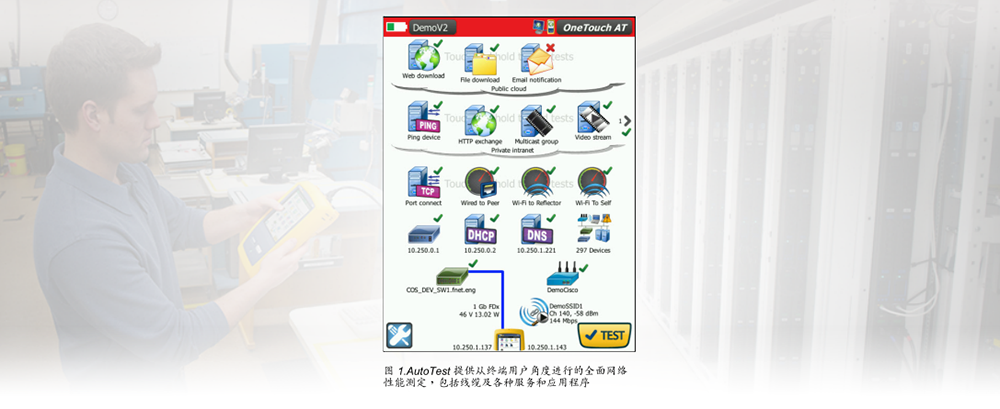 customers' views on performance
Most network failures come from the location where the customer device is connected to the network-this device may be a PC, tablet computer, smart phone, IP phone, printer, POS terminal, industrial equipment controller, medical imager, etc. Diagnose common problems by simulating client devices and evaluating network performance-or prove that the problem is not caused by the network.
Comprehensive Test from Jumper to Cloud
network problems may be relatively hidden. Determine the root cause of the problem by measuring and analyzing the performance of the main network components: network wiring, power over Ethernet (PoE), connection to the nearest switch, connection to the nearest access point, and main network service performance and server-based applications.
Cloud Trends
The trend feature automatically and repeatedly uploads automatic test results to the cloud to perform other analysis. Control the number of automated test results uploaded by setting the trend duration and interval. Once the trend is started, it will run automatically, and the user does not need to monitor the tester. Users do not need to be present to collect test results; Just start the trend and leave. Trend results can last up to 1 week or until manual stop. When network support staff are not present, long testing is useless to solve frequent intermittent problems.
cloud analysis
Open the OneTouch AT cloud service account to view and analyze the automatic test results uploaded by the trend function. Associate network events by viewing multiple test results in a parallel chart at the same time. All test results uploaded during a single trend session can be used for analysis. The number of tests is determined by the complexity of the automatic test profile, and the number of results is determined by the trend duration and interval. Select one or more tests in the trend session to analyze the results. Cloud services plot continuous results in monochrome coding charts to simplify analysis over time. The chart makes it easy to see irregular changes in performance. Amplification helps to analyze the sub-processes that make up each single test in more detail.
uses networked smart devices to access cloud services on web browsers anytime and anywhere through the network. Use a computer or smart device to view and analyze the results at any convenient time.
Basic cloud services are free of charge and include long-term storage of single trend sessions. Gold Cloud Service can store multiple trend sessions for a long time and is included in Gold Support Service.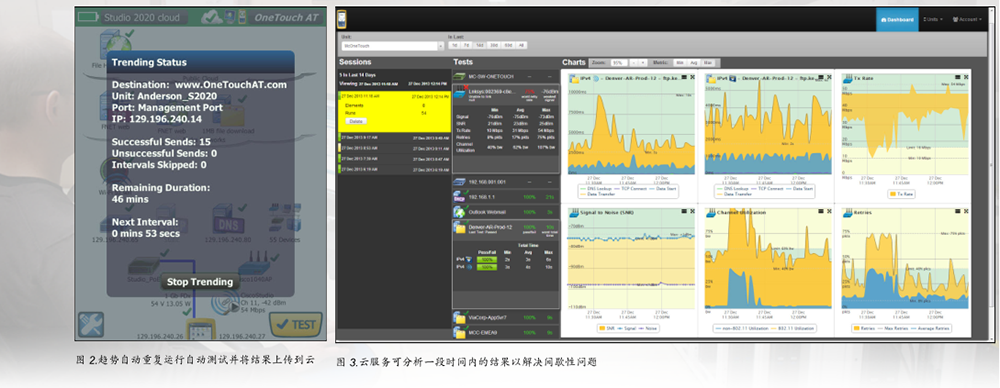
remote control and access to files
use the built-in RJ-45 management port or optional USB Wi-Fi adapter to remotely control OneTouch AT and remotely access saved files. Any operation performed directly on the OneTouch AT using the touch screen can be implemented remotely using a computer, notebook, tablet computer or smart phone. Use portable equipment to remotely manage OneTouch AT at any convenient time. Reduce the time, cost and other inconvenience spent on sending to customer locations reporting problems. Webcam supports real-time and remote viewing of the environment around the tester.
remotely control OneTouch AT and remotely access saved files from cloud service network applications. Work efficiency can be improved by remotely managing the tester and viewing the trend automatic test results from a certain location. Remote management through cloud service network applications also facilitates tracking of NAT devices, which is very beneficial for outdoor fault diagnosis.
problem avoidance and performance optimization
cloud trends and analysis allow you to take advantage of OneTouch AT to actively avoid problems and optimize performance. Set a long-term trend duration (up to a week) and use cloud service analysis to identify potential vulnerabilities and performance bottlenecks. In this usage model, the OneTouch AT acts as a 24/7 portable network probe and the cloud service acts as an analysis engine. Timely identification and correction of potential network, service or application vulnerabilities can avoid adverse effects on users. Identify performance bottlenecks and reconfigure the network to optimize end-user response time.
OneTouch AT is good at "prevention" (reactive fault diagnosis for continuous and intermittent problems) and daily network management (active problem avoidance and optimization of performance).
Copper and Fiber Cable Inspection
by measuring the wiring pattern and length of twisted pair cable, the cable performance problem is solved. Use cable identifiers and IntelliTone™Audio technology finds and determines the cable. The received optical power is measured through the optical fiber cable connection. By using FiberInspector™The USB video probe looks at the end face of the connector and checks the cleanliness of the optical fiber connection.
PoE test
through TruePower™Load test to check whether PoE was successfully provided. Simulate 802.3at (PoE +) 1-4 class live equipment and measure power up to 25.5 watts. Check the applied and received PoE levels, used wire pairs, PSE types, measured PoE no-load and under-load voltages, and PoE under-load power supply.
Wired and Wi-Fi Client Connection Test
understand how clients connect to wired infrastructure by testing link negotiation, determining the nearest switch, and monitoring major switch port statistics. Learn how the client connects to the Wi-Fi infrastructure by testing the link between the client and the nearest access point, identifying the AP name, channel and security type, following the authentication and association process, and monitoring major AP and network statistics (including AP roaming details).
Network Service Test
Test the response capability of the DHCP server. Identify wired and Wi-Fi DHCP servers to view quotes, acceptance times, and rental information. Test DNS server responsiveness. Determine wired and Wi-Fi DNS servers and view DNS lookup times.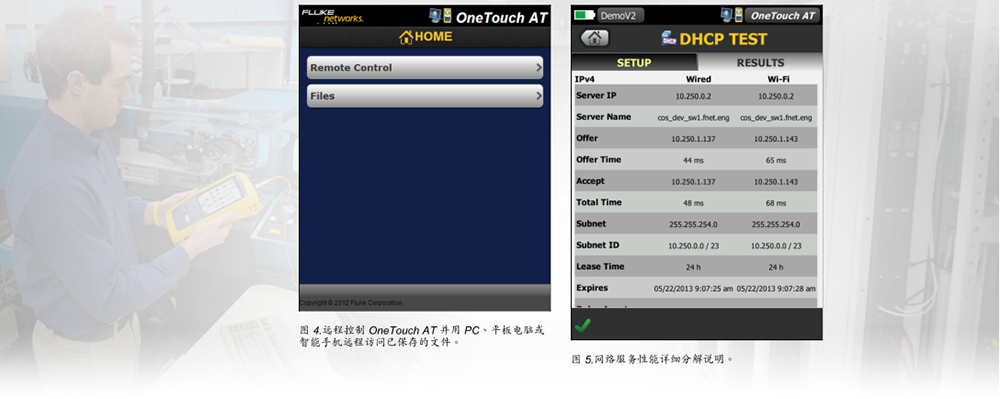
Network Application Test
determines whether the server-based application is the source of the reported problem by measuring availability and response indicators. Add application-appropriate performance tests to the automated test profile: ping (ICMP), connection (TCP), network (HTTP), file (FTP), multicast (IGMP), video (RTSP), or email (SMTP). All tests are represented in the form of icons on the OneTouch AT homepage. After running the automatic test, click the test icon on the home page to obtain a detailed breakdown of the application performance, including DNS search time, server response time, and data rate. The test results are also displayed to easily compare wired/Wi-Fi and IPv4/IPv6 performance. Here are a few examples: ping your WLAN controller, connect to the port 2000 on the VoIP call manager, download application pages with a Web interface, upload or download files from the server, subscribe to multicast groups, access video content in the on-demand streaming video server, or send text message e-mail to your mobile phone.
Local, Intranet, and Internet performance
understand the performance of network services and server-based applications hosted in local data centers, corporate intranet servers, or servers accessed through public networks. Create a location-centric automated test profile by combining collaborative location services and applications. Measure the service level of different groups and quickly find out the problem.
Performance evaluation of end-to-end paths
ensure that newly installed or upgraded wired and Wi-Fi networks meet SLA targets and meet the needs of new and higher bandwidth applications through end-to-end path performance evaluation. Evaluate throughput, frame loss, delay, and jitter between local OneTouch AT and remote OneTouch AT peer devices or remote LinkRunner reflectors. Remote peer devices provide upstream and downstream results, while remote reflectors provide round-trip results. The performance at a rate of 1 Gbps is evaluated on copper wire and optical fiber networks, and the performance at a rate of 100Mbps is evaluated on Wi-Fi networks. The existence of special-purpose models helps to realize the test between OneTouch AT wired interface and Wi-Fi interface on the same device without remote equipment.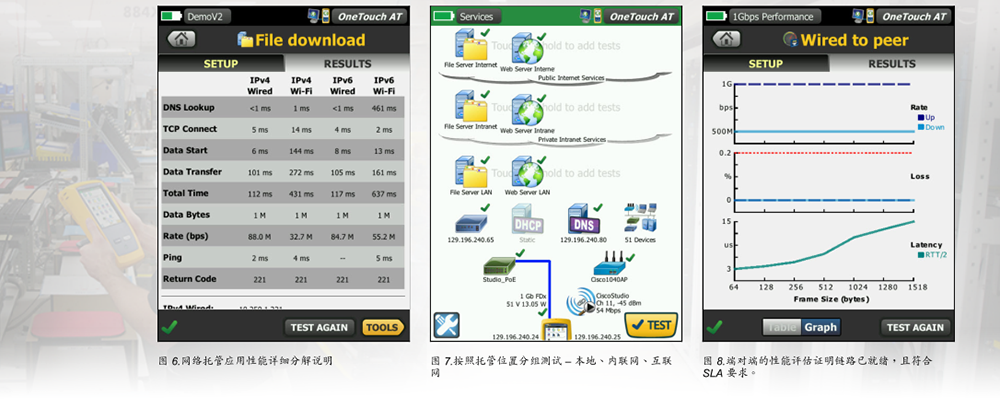 Wi-Fi Discovery and Analysis
automatically discover Wi-Fi device and key device attributes. Select from nineteen context-dependent sorts to get different views of the wireless network. For example, sorting according to signal strength can solve the Wi-Fi coverage problem. According to the MAC manufacturer ranking, the type of Wi-Fi device and its connection to SSID, AP and channel can be found. Channel spacing and usage problems can be confirmed according to channel sorting. Ranking according to authorization status can identify potential security violations. Other discovery-assisted analysis tools help solve problems and implement them safely. If Wi-Fi devices are also found through wired analysis, the cross-link function can help switch between wired and Wi-Fi analysis views with one click.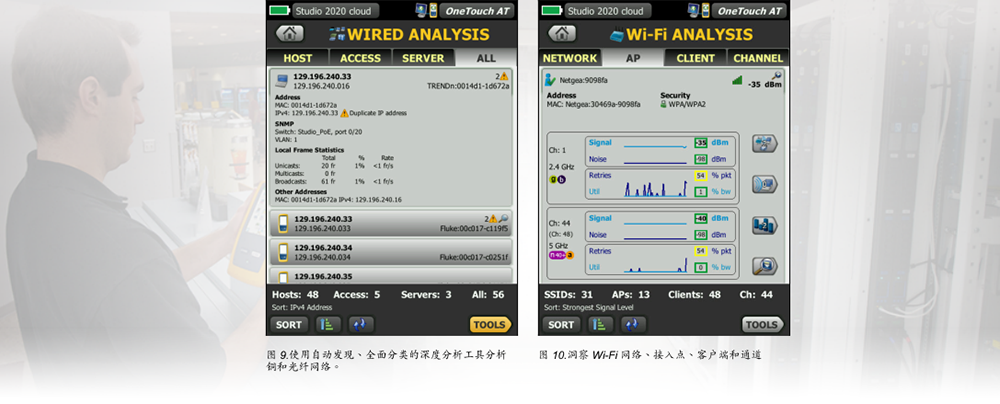
Online VoIP analysis
realize OneTouch AT connection between IP phone and network online for real-time troubleshooting and analysis. VoIP analysis tests revealed related problems of PoE, DHCP, TFTP, SIP and SCCP. This test can understand unencrypted SIP and SCCP traffic to debug VoIP telephony problems and quantify VoIP call quality. You can choose to capture VoIP sessions at the same time.
Capture package
captures wired, Wi-Fi, VoIP, and automated test traffic when you need to use packet-level views to solve complex network or application problems. The most important part is captured by filtering traffic. The capture file is exported to the computer for decoding and analysis with protocol analysis software. Captures wired traffic for a single port, a set of two ports, or an online port between the client device and the network. Online capture avoids the complexity, time and cost of configuring switch mirror ports or installing separate splitters. Wi-Fi traffic (20 MHz or 40 MHz) is captured through channels and modes.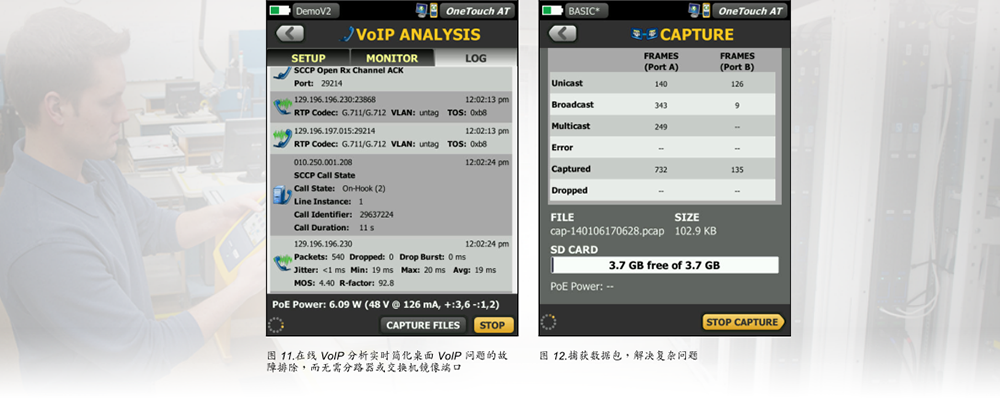
to improve collaboration efficiency
collaborate more effectively with colleagues, consultants, integrators and suppliers by sharing packet capture, screenshots and AutoTest reports. Remote control and view of the user interface, as well as remote access to files with a computer, tablet or smartphone. The webcam can be connected to the OneTouch AT to view the test environment in real time.
Troubleshooting IPv6 network failures
can easily compare the similarities and differences between IPv4 and IPv6 wired and wireless network performance by referring to the parallel test results.
Save test results
save the test results in a PDF report and share them with colleagues or external parties. The report is a ticket file that records historical benchmark performance and is also a certification report after the deployment of the new infrastructure. Determine the test results that should be included in the report: setup, automatic test, wired analysis, Wi-Fi analysis, or VoIP.
Installation Wizard
understand the functions of the tester by running the installation wizard and simplify the process of creating automatic test configuration files. The step-by-step instructions, yes/no prompts, on-screen help, and graphical progress indicators in the wizard simplify the process of creating configuration files. If necessary, experienced users can skip the wizard.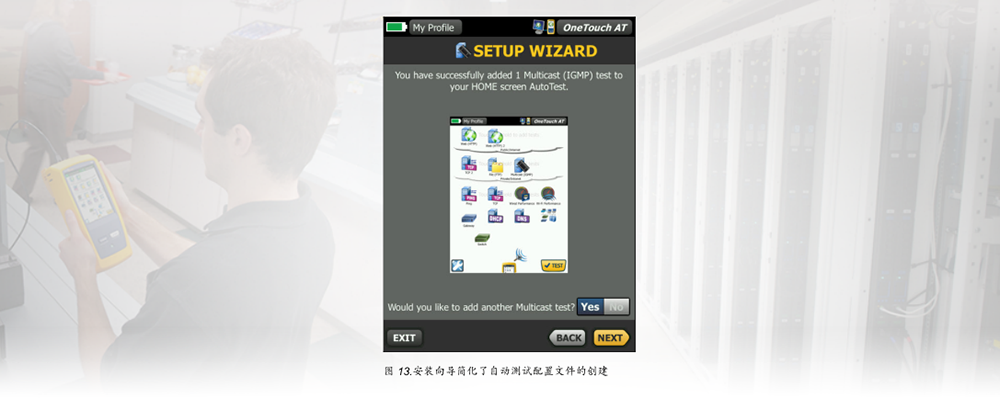
field testing
OneTouch AT is specially designed for network support professionals working on mobile. Useful testing and management tools include web browsers, Telnet/SSH clients, cable audio generators, and alternative fiber optic connector inspection cameras. The durable platform provides reliable guarantee for long-term operation in harsh environment.
Versiv™Test platform
As the demand for testing increases, the testing function is expanded by adding new modules. Available modules include DSX-5000 CableAnalyzer™CertiFiber®Pro OLTS and OptiFiber®Pro OTDR.
Gold Medal Support Service
protect your investment through gold medal support services. Gold support services include Gold Cloud services, software upgrades and MIB upgrades, unlimited priority repair services for borrowed equipment, annual factory performance verification, free replacement of accessories, and 24/7 technical support using member priority access numbers.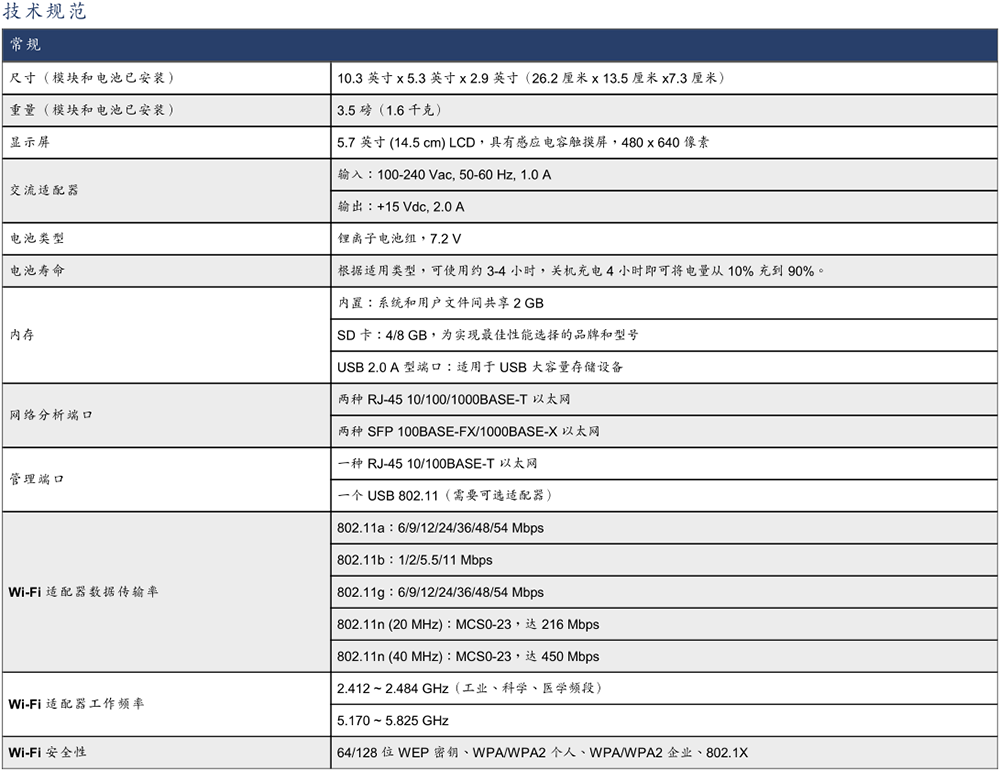
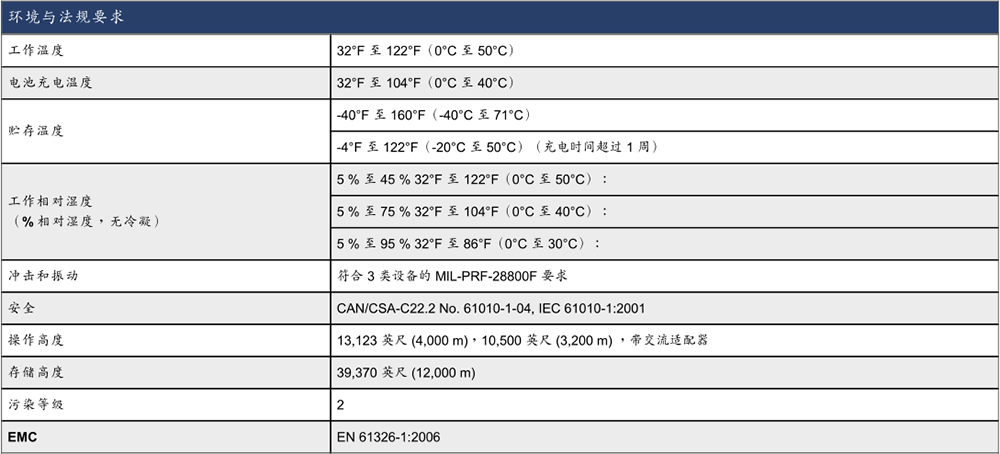

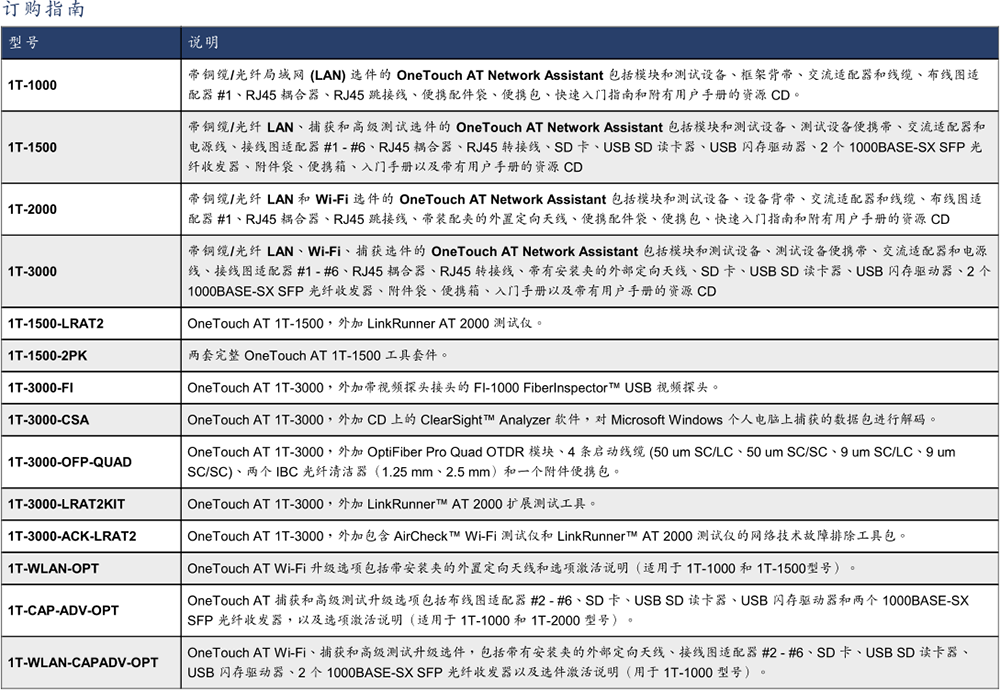
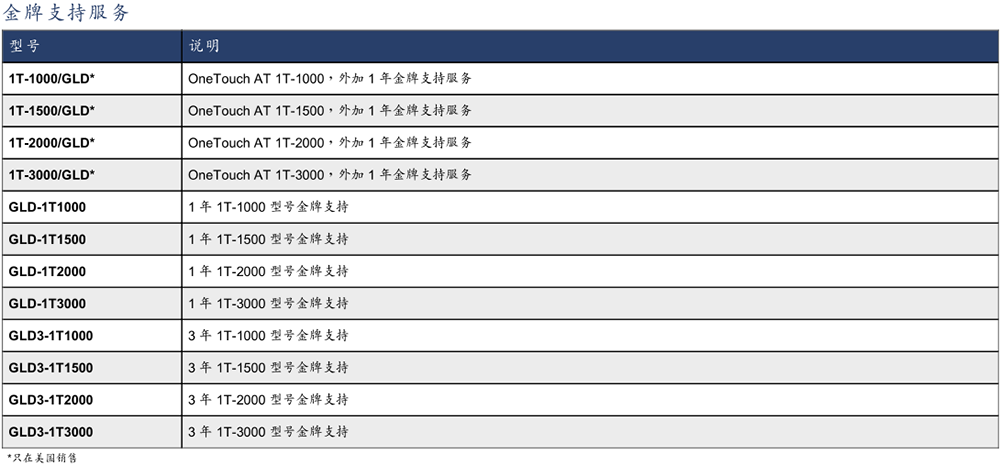
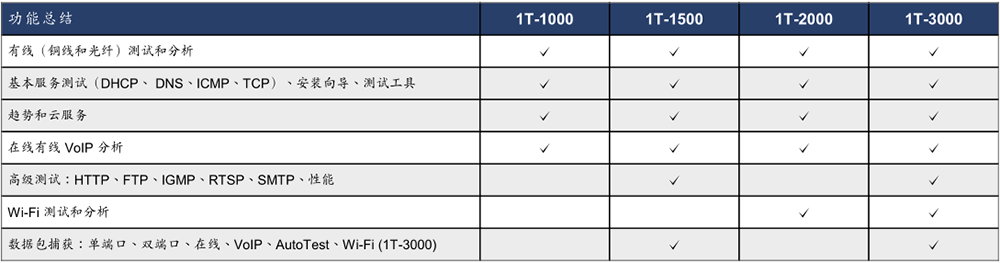
For a complete list of technical indicators, models, options, and accessories, visit www.flukenetworks.com/OneTouchAT
